


One AI hits its limit. Switch and continue.
Claude runs out of tokens — you move to Codex in one click, same project and context. Your work never stops.
WITH TERMINALSYNC:
TerminalSync keeps working while you do other things.
Build in minutes: CRM · Portals · Dashboards · Inventory · Proposals · Automations · Reports · Quotes
macOS · Linux · Windows
Drag your everyday tools into your session. No keys, no setup.


You describe it in your words. The AI builds it. And you see it instantly.
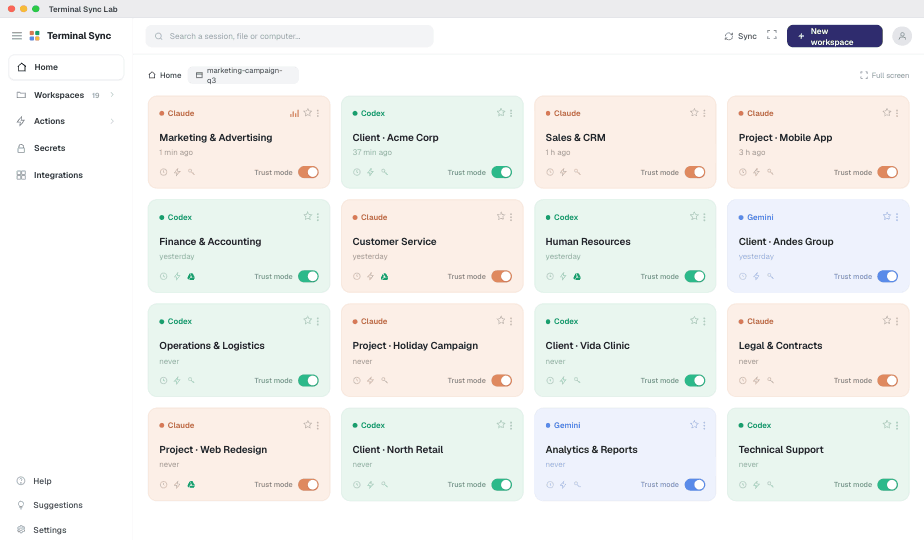
It's not a video: it's TerminalSync running. Watch it live and try it yourself.
Claude runs out of tokens — you move to Codex in one click, same project and context. Your work never stops.
Claude thinks, Codex builds, Gemini analyzes. Out of tokens? Continue on another AI, without losing context.
Ask for a job and the 3 AIs do it: Claude writes, Codex builds, Gemini reviews — and it's ✅ delivered.
TerminalSync recommends the right mode for each task — and tells you how much you save before switching.
Close everything and switch computers — your session, context and memory follow you, intact.
Drag Gmail, Drive, Notion and more into your session. No keys, nothing to set up. Ready to work.
The same conversation continues on your phone — you reply from the chat and your AIs keep working, without opening the laptop.
Not sure what to reply? The AI drafts or polishes your message for you — so you get more out of each AI.
Drag in Gmail, Drive, Notion, Slack or whatever you use every day. No keys, no setup. Ready to work.
Terminal Sync helps you review, prepare, and respond across Meta channels. You approve, Terminal Sync executes: nothing is posted, sent, activated, or spent without your explicit confirmation.
We do not promise automatic posting, sending, activation, or spend. First you see the draft, account, audience, budget, or suggested reply; then you decide whether to approve.
Say what you need, in your words. No code, nothing to configure.
The AIs work in parallel and create it — and show it to you, done.
It stays running, maintains itself, and gets better as you use it.
Connect your project folder once. The AI understands your documents, remembers the context and always works on the latest version — without you uploading anything.
You don't bring your files to the AI. TerminalSync brings the AI to where you already work.
Your AI team — reads the latest version, no uploading needed
Here's exactly what someone like you builds.
Leads and follow-ups slip through; deals go cold.
Never lose a deal to a missed follow-up.
For the first time you can grow your company's capacity without hiring more people. You decide and approve; your digital team executes in parallel. And if one specialist stops, another continues.
Your code stays in Git. Your AI terminals travel with the project folder.
TerminalSync stores workspace identity in .terminalsync/; your real files still move through commits, branches, push and pull.
Your AI team. One computer. All in sync.
Analysis, planning and writing. It already knows your business.
Creates and automates the work. Same context, another specialist.
Reads and understands whole PDFs, images and videos. Free, nothing to set up.
AIs have limits. Your projects shouldn't. When one stops responding, TerminalSync continues the project — no lost context, no copying, no starting over.
Detects when an AI hits its limit, goes down or stops responding — without you watching.
Passes the project to another available AI. You don't do a thing.
Picks up with the project, decisions, and where you left off — intact.
It doesn't start over: it continues the project at the exact point of the cutoff.
A single-AI tool can't do this. TerminalSync doesn't depend on any one of them — that's why your work never hits a wall.
While other platforms end conversations, TerminalSync finishes projects.
From WhatsApp or Telegram, give the instruction. Your AIs keep working. No need to open the laptop.
It's not AI memory: it's your company's knowledge, and it never gets lost.
It remembers:
By day 30 it understands your flow better than someone new joining your team.
All local, encrypted, and portable. Zero configuration.
Active from your first session. No extra install, no technical setup, no server of ours in the middle.
Move the controls to match your reality. We measure hours of work recovered — not the cost of technology.
Proposals, reports, follow-ups, invoices, posts…
The ones that follow a pattern: the AI runs them and you just review.
Equivalent to one full-time person
Before: lost mornings and conversations that start from scratch. After: your company's work picks up right where you left it, no matter what you're doing.
Each of these tools is great at its own thing. TerminalSync plays a different game: your company's work flows, is remembered, and gets finished.
Stacked against the tools you're already using every day. If something is partial or still in progress, the table says so.
Comparison based on each tool's public information. Your files never pass through our servers — they go straight to your own cloud; your secrets and conversations travel encrypted.
Companies of every size already work with their AI team on TerminalSync.
I used to have campaigns in WhatsApp, files in Google Drive and conversations split between ChatGPT and Claude. Now everything lives in a single Workspace and my team never starts from scratch again.
What surprised me most was letting go of thinking in chats. Now I have one space for sales, another for operations and another for accounting. It feels like having entire departments working with AI.
We connected WhatsApp to TerminalSync and the AI already knows the full history of every client. Replies are much faster and the team stopped copying and pasting information all day.
Important alerts arrive straight to Telegram. When an analysis, a proposal or a long job finishes, I simply get the notification and review the result from my phone.
Being able to switch between Claude, Codex and Gemini without losing context saves us a huge amount of time. We no longer have to rebuild the project every time we change models.
For years it was just me doing sales, proposals, marketing and support. With TerminalSync I feel that, for the first time, I have a digital team that helps me get work done without hiring more people.
The best part isn't having several AIs. The best part is that my company now remembers everything. Each project keeps its history, its files and its decisions. It feels like hiring a team that never forgets.
We automated guest check-in, messages and front-desk communication. What used to involve several manual steps now simply happens while we keep running the business.
Nothing to install on your Mac. Paste your 3 API keys (BYOK), open the popup, and ask Claude, Codex, and Gemini the same prompt in parallel from any tab.
Start free. 7 days with every Max feature — cancel before day 7 and you're not charged. AIs run on your own subscription (or their free plans): TerminalSync doesn't resell you tokens.
For anyone starting to organize their business with AI.
Bring your own Claude, Codex, or Gemini account.
7 days free with all features
Pro with TerminalSync's AI included — no account needed.
7 days free with all features
Max, bringing your own AI account.
7 days free with all features
Max with TerminalSync's AI included — no account needed.
7 days free with all features
Your secrets, settings, memory and AI conversations are encrypted on your computer before leaving. Everything goes to YOUR cloud, not ours — your files never pass through our servers.
✓ Try it 7 days free. Cancel before day 7 and you're not charged.
Still got questions? Email support@terminalsync.ai
If you produce AI, automation, or productivity content, earn 30% recurring for life every time someone signs up via your link. As long as they pay, you get paid.
7 days of Pro free. Cancel before day 7 and you're not charged. If it clicks, you stay. If not, you stop using it. Done.